Synthèse
An extent is a rectangle specified by providing the coordinate of the lower left corner and the coordinate of the upper right corner in map units.
Discussion
The Extent object supports equal (==) and not equal (!=) operators for comparing extents.
Remarque :
When used as input to Extension ArcGIS Spatial Analyst tools—Create Constant Raster, Create Normal Raster, Create Random Raster, Extract By Rectangle, Extract by Mask, and Topo To Raster—only the XMin, YMin, XMax, and YMax values are used by these tools.
Syntaxe
Extent ({XMin}, {YMin}, {XMax}, {YMax}, {ZMin}, {ZMax}, {MMin}, {MMax}, {spatial_reference})| Paramètre | Explication | Type de données |
XMin | The extent XMin value. | Double |
YMin | The extent YMin value. | Double |
XMax | The extent XMax value. | Double |
YMax | The extent YMax value. | Double |
ZMin | The extent ZMin value. The value is None if there is no z-value. | Double |
ZMax | The extent ZMax value. The value is None if there is no z-value. | Double |
MMin | The extent MMin value. The value is None if there is no m-value. | Double |
MMax | The extent MMax value. The value is None if there is no m-value. | Double |
spatial_reference | The spatial reference of the extent. | SpatialReference |
Propriétés
| Propriété | Explication | Type de données |
| JSON (Lecture seule) | A JSON representation of the extent as a string. Conseil :The returned string can be converted to a dictionary using the json module's loads function. | String |
| MMax (Lecture seule) | The extent MMax value. The value is None if there is no m-value. | Double |
| MMin (Lecture seule) | The extent MMin value. The value is None if there is no m-value. | Double |
| XMax (Lecture seule) | The extent XMax value. | Double |
| XMin (Lecture seule) | The extent XMin value. | Double |
| YMax (Lecture seule) | The extent YMax value. | Double |
| YMin (Lecture seule) | The extent YMin value. | Double |
| ZMax (Lecture seule) | The extent ZMax value. The value is None if there is no z-value. | Double |
| ZMin (Lecture seule) | The extent ZMin value. The value is None if there is no z-value. | Double |
| depth (Lecture seule) | The extent depth value. The value is None if there is no depth value. | Double |
| geohash (Lecture seule) | A geohash string of the extent. | String |
| geohashCovers (Lecture seule) | A list of up to the four longest geohash strings that fit within the extent. | String |
| geohashNeighbors (Lecture seule) | A list of the geohash neighbor strings for the extent. | String |
| height (Lecture seule) | The extent height value. | Double |
| lowerLeft (Lecture seule) | The lower left property: A point object is returned. | Point |
| lowerRight (Lecture seule) | The lower right property: A point object is returned. | Point |
| polygon (Lecture seule) | Returns the extent as a polygon object. | Polygon |
| spatialReference (Lecture seule) | The spatial reference of the extent. | SpatialReference |
| upperLeft (Lecture seule) | The upper left property: A point object is returned. | Point |
| upperRight (Lecture seule) | The upper right property: A point object is returned. | Point |
| width (Lecture seule) | The extent width. | Double |
Vue d’ensemble des méthodes
| Méthode | Explication |
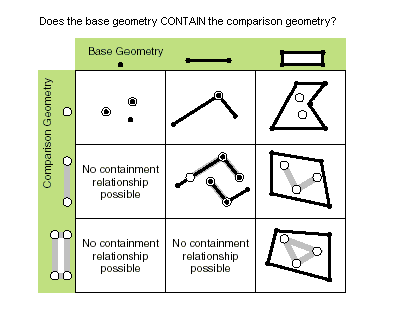
| contains (second_geometry, {relation}) | Specifies whether the base geometry contains the comparison geometry. The contains method is the opposite of the within method. Only True relationships are shown in this illustration.
|
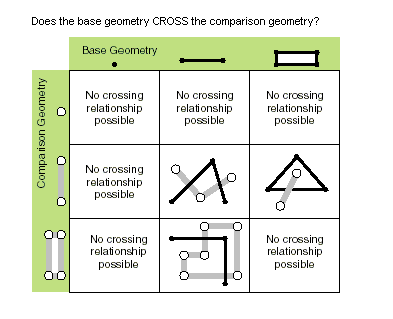
| crosses (second_geometry) | Specifies whether the two geometries intersect in a geometry of a lesser shape type. Two polylines cross if they share only points in common, at least one of which is not an endpoint. A polyline and a polygon cross if they share a polyline or a point (for a vertical line) in common on the interior of the polygon that is not equivalent to the entire polyline. Only True relationships are shown in this illustration.
|
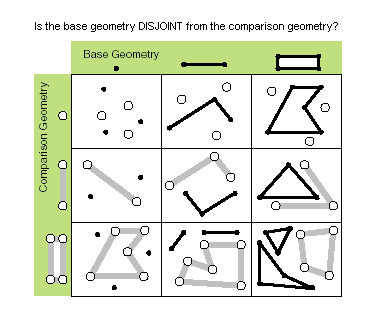
| disjoint (second_geometry) | Specifies whether the base and comparison geometries have points in common. Two geometries intersect when this method returns False. Only True relationships are shown in this illustration.
|
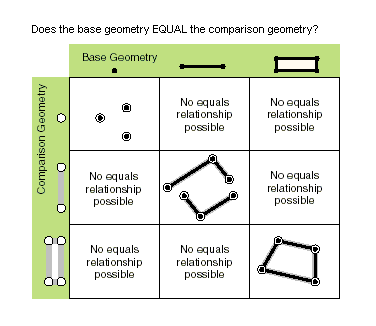
| equals (second_geometry) | Specifies whether the base and comparison geometries are of the same shape type and define the same set of points in the plane. This is a 2D comparison only; m- and z-values are ignored. Only True relationships are shown in this illustration.
|
| overlaps (second_geometry) | Specifies whether the intersection of the two geometries has the same shape type as one of the input geometries and is not equivalent to either of the input geometries. Only True relationships are shown in this illustration.
|
| projectAs (spatial_reference, {transformation_name}) | Projects a geometry from one spatial reference to another. When the geometry object and the destination spatial reference do not have a common datum, specify a transformation_name parameter value. For more information, see Geographic datum transformations and ListTransformations. A vertical transformation will be performed when the following criteria are met:
When the transformation_name parameter value is a vertical transformation, and neither the geometry object nor the destination spatial reference have a vertical coordinate system, the function will fail with a ValueError exception. If either the geometry object or the spatial_reference parameter value have an unknown spatial reference, the output geometry's spatial reference will be that of the spatial_reference parameter value. Use of unknown spatial reference is not recommended for analysis. The projectAs method will not modify m-values, if present. |
| touches (second_geometry) | Specifies whether the boundaries of the geometries intersect. Two geometries touch when the intersection of the geometries is not empty, but the intersection of their interiors is empty. For example, a point touches a polyline only if the point is coincident with one of the polyline end points. Only True relationships are shown in this illustration.
|
| within (second_geometry, {relation}) | Specifies whether the base geometry is within the comparison geometry. The within method is the opposite operator of the contains method. Only True relationships are shown in this illustration.
The base geometry is within the comparison geometry if the base geometry is the intersection of the geometries, and the intersection of their interiors is not empty. The within method is a Clementini operator, except in the case of an empty base geometry. |
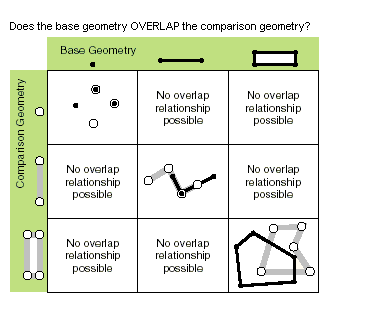
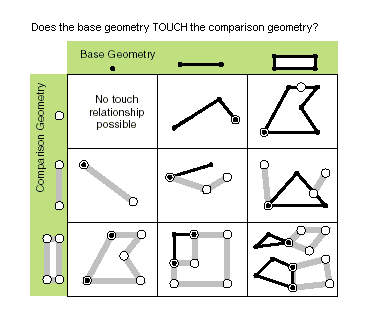

Méthodes
contains (second_geometry, {relation})| Paramètre | Explication | Type de données |
second_geometry | A second geometry. | Object |
relation | Specifies the spatial relationship type that will be used.
(La valeur par défaut est None) | String |
| Type de données | Explication |
| Boolean |
Returns whether this geometry contains the second geometry. |
crosses (second_geometry)
| Paramètre | Explication | Type de données |
second_geometry | A second geometry. | Object |
| Type de données | Explication |
| Boolean | Returns whether the two geometries intersect in a geometry of a lesser shape type. |
disjoint (second_geometry)
| Paramètre | Explication | Type de données |
second_geometry | A second geometry. | Object |
| Type de données | Explication |
| Boolean | Returns whether the two geometries have points in common. |
equals (second_geometry)
| Paramètre | Explication | Type de données |
second_geometry | A second geometry. | Object |
| Type de données | Explication |
| Boolean |
Returns whether the two geometries are of the same shape type and define the same set of points in the plane. |
overlaps (second_geometry)
| Paramètre | Explication | Type de données |
second_geometry | A second geometry. | Object |
| Type de données | Explication |
| Boolean | Returns whether the intersection of the two geometries has the same dimension as one of the input geometries. |
projectAs (spatial_reference, {transformation_name})| Paramètre | Explication | Type de données |
spatial_reference | The spatial reference to which the geometry will be projected. The value can be a SpatialReference object or the coordinate system name. | SpatialReference |
transformation_name | The geotransformation name. With ArcGIS Pro, if you do not specify a transformation, none will be applied. With ArcGIS Server, if you do not specify a transformation, a fallback transformation will be applied. | String |
| Type de données | Explication |
| Object | The projected geometry. |
touches (second_geometry)
| Paramètre | Explication | Type de données |
second_geometry | A second geometry. | Object |
| Type de données | Explication |
| Boolean | Returns whether the boundaries of the geometries intersect. |
within (second_geometry, {relation})| Paramètre | Explication | Type de données |
second_geometry | A second geometry. | Object |
relation | Specifies the spatial relationship type that will be used.
(La valeur par défaut est None) | String |
| Type de données | Explication |
| Boolean | Returns whether the base geometry is within the comparison geometry. |
Exemple de code
Display extent object properties for features.
import arcpy

feature_class = 'c:/Data/Florida.gdb/airports'

# Fetch each feature from the cursor and examine the extent properties
for row in arcpy.da.SearchCursor(feature_class, ['SHAPE@', 'CNTY_NAME']):
    extent = row[0].extent
    print('Extent of county {}:'.format(row[1]))
    print('XMin: {}, YMin: {}'.format(extent.XMin, extent.YMin))
    print('XMax: {}, YMax: {}'.format(extent.XMax, extent.YMax))
Rubriques connexes
Vous avez un commentaire à formuler concernant cette rubrique ?